
 subhojit Manna
Introduction
Managing daily expenses can quickly become a time-consuming task, especially when businesses and individuals deal with multiple receipts, invoices, and payment records. Manually entering expense details, organizing paper receipts, and maintaining financial records often leads to errors, misplaced documents, and unnecessary administrative work.
Technology is changing how expenses are managed. Receipt scanning and Optical Character Recognition (OCR) make it possible to capture information directly from receipts and convert it into digital records.
Instead of manually typing every expense, users can simply scan a receipt and let the software extract important details. This makes expense management faster, more organized, and easier to maintain.
What Is Receipt Scanning?
Receipt scanning is the process of capturing a digital image of a physical receipt using a smartphone camera or scanner.
Once captured, the receipt can be stored digitally, making it easier to access and manage expense records without keeping physical copies.
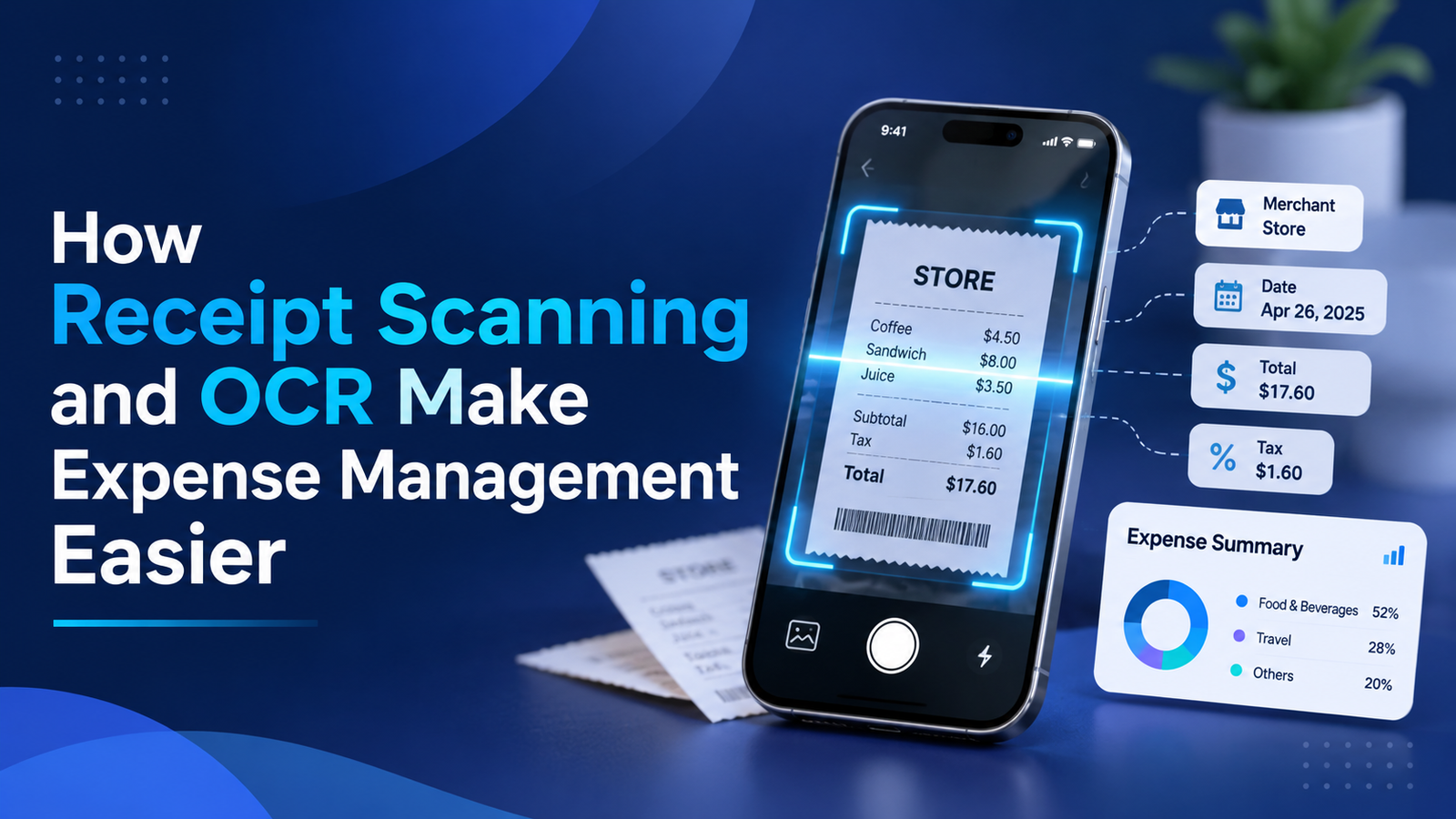
Modern expense management applications go beyond simply saving receipt images. They use OCR technology to identify and extract relevant information, such as:
- Merchant or business name
- Transaction date
- Total amount paid
- Tax details, when available
- Other relevant transaction information
This reduces the need for manual data entry and makes expense recording more convenient.
What Is OCR and How Does It Work?
Optical Character Recognition (OCR) is a technology that identifies text within images and converts it into machine-readable digital information.
When a user scans a receipt, OCR processes the image, detects printed characters, and extracts relevant details.
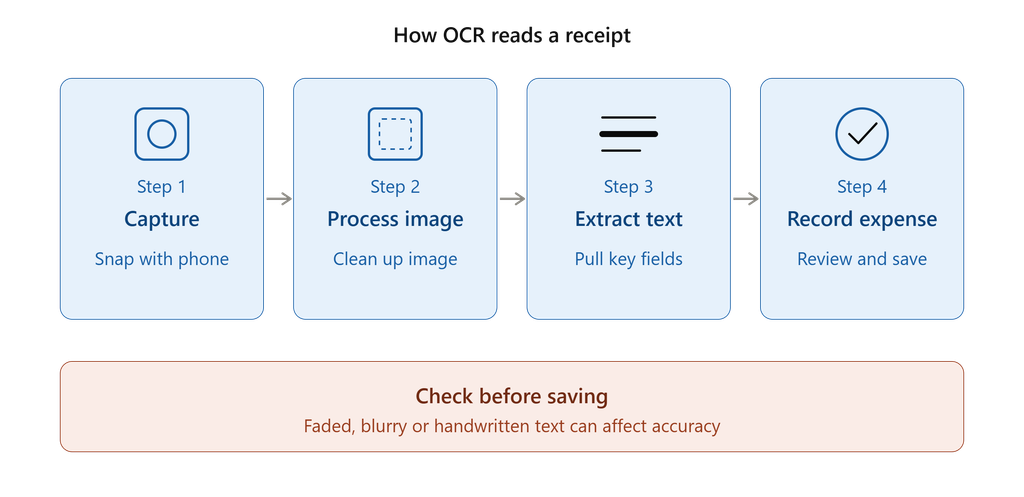
A typical OCR-based receipt scanning process involves four steps:
- Capture the Receipt: Take a photograph of the receipt using a smartphone camera.
- Image Processing: The system prepares the image for text recognition by improving readability and identifying text regions.
- Text Extraction: OCR identifies and extracts information such as dates, merchant names, and amounts.
- Digital Expense Recording: Extracted information is presented as a digital expense record for review and saving.
The extracted information should be checked before saving, as unclear images, faded printing, unusual layouts, or handwritten details can affect recognition accuracy.
7 Ways Receipt Scanning and OCR Make Expense Management Easier
1. Reduces Manual Data Entry
Manually entering expense details from every receipt takes time and effort. OCR automates much of this process by extracting information directly from scanned receipts.
Users spend less time typing transaction details and more time focusing on important tasks.
2. Improves Expense Tracking Accuracy
Manual entry can result in incorrect amounts, dates, or merchant names. OCR helps reduce these errors by extracting information directly from the receipt.
Reviewing extracted details before saving further improves record accuracy.
3. Keeps Receipts Digitally Organized
Paper receipts can easily become damaged, misplaced, or difficult to retrieve.
Digital receipt scanning allows users to maintain expense records in one accessible location. This makes reviewing previous transactions and finding specific receipts much easier.
4. Saves Time on Expense Recording
Recording expenses individually can become frustrating when there are multiple daily transactions.
With receipt scanning, users can capture a receipt and extract its details within a streamlined workflow. This makes regular expense tracking more convenient.
5. Simplifies Financial Reporting
Organized digital expense records make it easier to review spending patterns and prepare financial reports.
When expense information is recorded consistently, users can analyze transactions and export records for further review, accounting, or documentation.
6. Supports Better Expense Monitoring
Having digital records of daily purchases provides better visibility into spending habits.
Users can review transaction history, understand where their money goes, and make more informed spending decisions.
7. Reduces Paperwork and Improves Accessibility
Digital receipt storage reduces dependence on physical paperwork. Users can access their recorded expenses through supported devices and applications, making expense management more flexible.
Who Can Benefit from OCR-Based Receipt Scanning?
Receipt scanning is useful for individuals as well as businesses that regularly handle expenses.
- Individuals: Track everyday purchases and maintain personal expense records.
- Freelancers: Organize business-related purchases and maintain records for financial reporting.
- Small Businesses: Simplify the recording and organization of operational expenses.
- Business Professionals: Keep track of travel, food, transportation, and other work-related expenses.
- Finance Teams: Reduce repetitive data entry and make expense documentation easier to manage.
The Future of Expense Management Is Digital
Expense management is moving towards smarter, more automated solutions. Technologies such as OCR, Artificial Intelligence (AI), and cloud-based applications are making it easier to capture, organize, and understand financial information.
As these technologies continue to evolve, expense management applications can offer more convenient ways to record transactions, analyze spending, and maintain financial records.
The goal is not just to digitize receipts but to make expense tracking simpler and more accessible.
How VoiceSpend Makes Expense Tracking Easier
Modern expense tracking applications combine convenient features to simplify everyday financial management.
VoiceSpend helps users record and manage expenses with features designed for convenient expense tracking.
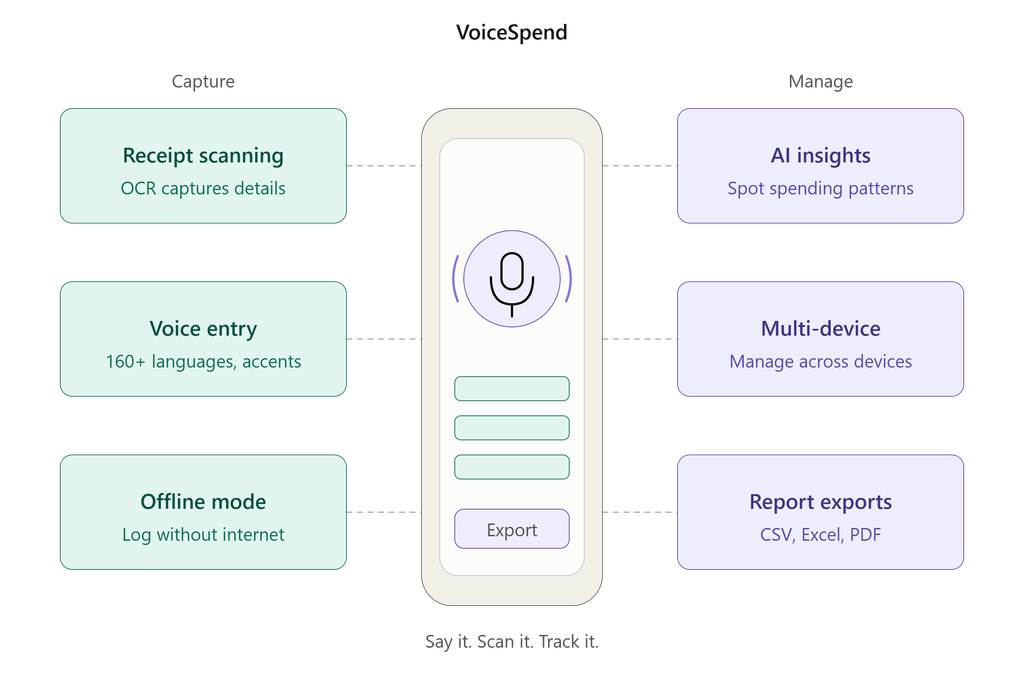
Its capabilities include:
- Receipt Scanning with OCR: Capture receipt information and simplify expense recording.
- Voice-Based Expense Entry: Record expenses using voice input with support for 160+ languages and accents.
- Offline Mode: Record expenses even without an active internet connection.
- AI Insights: Understand spending patterns through intelligent expense insights.
- Multi-Device Management: Manage expense records across supported devices.
- Report Exports: Export expense records in CSV, Excel, and PDF formats.
By bringing these capabilities together, VoiceSpend makes it easier to maintain organized expense records and stay informed about everyday spending.
Explore VoiceSpend: https://play.google.com/store/apps/details?id=com.bwj.voicespend
Conclusion
Receipt scanning and OCR are transforming expense management by reducing manual work, improving record organization, and making financial information easier to access.
Whether managing personal purchases or business expenses, digital receipt processing offers a practical way to simplify everyday financial tasks.
With solutions like VoiceSpend, users can take advantage of receipt scanning, voice-based expense recording, and intelligent insights to make expense tracking more convenient.
Spend less time recording expenses and more time understanding where your money goes.

subhojit Manna
Writing for BWJ Tech Solutions.